Run your cleaning business from one simple system
Capture leads, manage clients, schedule jobs, assign cleaners, send professional invoices and track payments — all from one connected system.
Built for solo cleaners and growing cleaning teams.
Explore the real application.
- Live working demo
- Built for cleaning businesses
- Works on desktop & mobile
- Multi-user access
Stop running your business from five different places
Most cleaning businesses don't have a software problem. They have six half-systems that don't talk to each other.
The old way
- FacebookLeads sitting in messages
- WhatsAppQuotes and job changes
- SpreadsheetThe client list, mostly
- Phone calendarThis week's jobs
- Word documentInvoices, retyped each time
- Bank accountWho actually paid
The new way
One system, one connected record
- 01Lead
- 02Client
- 03Booking
- 04Cleaning job
- 05Invoice
- 06Payment
How it works
From first lead to paid invoice — all in one workflow
Seven steps, one record. Nothing gets re-typed between them.
-
01
Capture the lead
Record enquiries from Facebook, Google, referrals, phone calls or anywhere else.
-
02
Convert to client
Turn a won lead into a client without entering the same details twice.
-
03
Book the job
Set the date, time, service, address, price and assigned cleaner.
-
04
Manage the job
Your cleaner sees exactly what they need — and nothing they shouldn't.
-
05
Complete the clean
Update the status and the customer's history keeps itself in order.
-
06
Create the invoice
Raise a professional invoice straight from the completed job.
-
07
Record the payment
Paid, partly paid or still outstanding — tracked against each invoice.
The software
See the software in action
Real screens from the application — not illustrations of one.
Dashboard
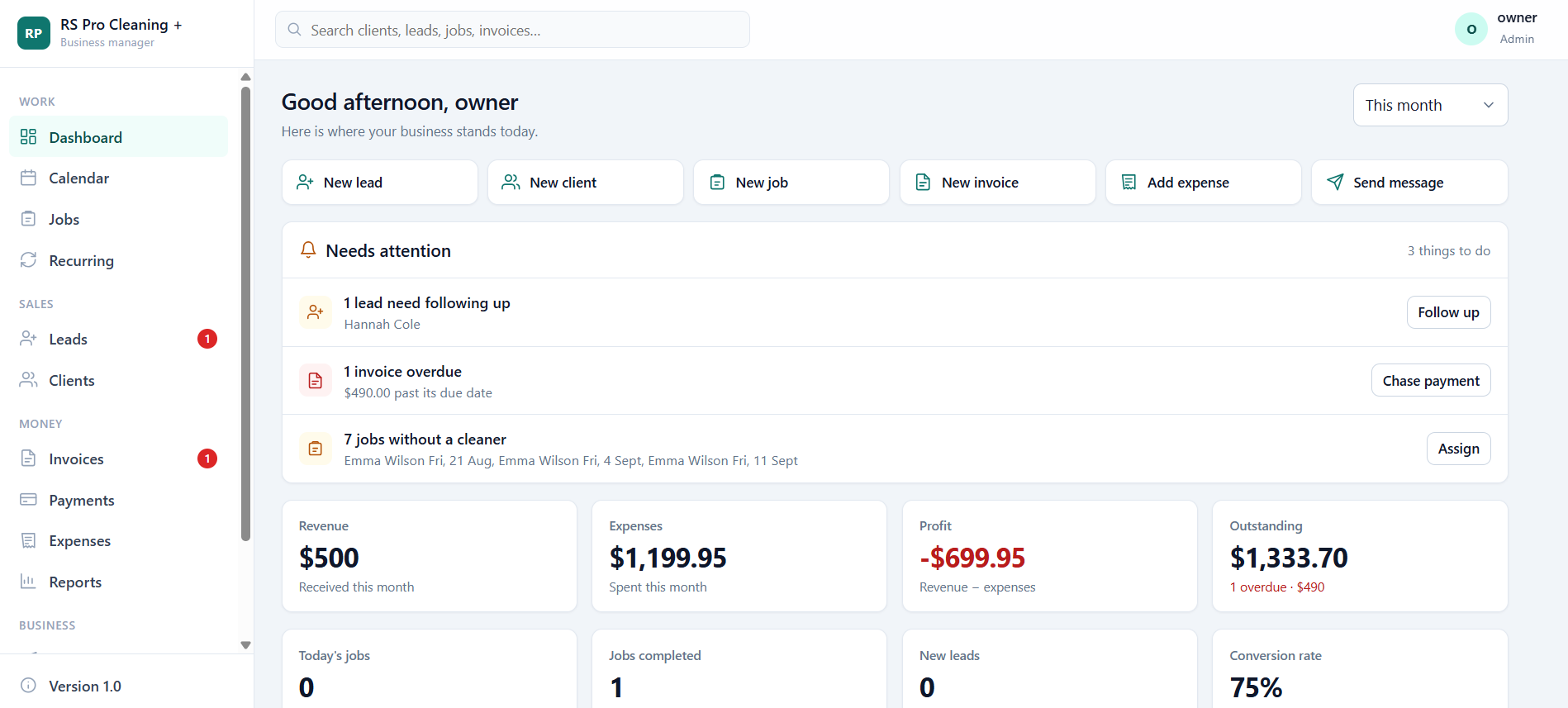
Know what's happening in your business at a glance — revenue, expenses, profit and outstanding invoices for the period, alongside today's jobs and your conversion rate.
The benefit: the "needs attention" panel tells you what to chase today — leads to follow up, invoices past due, jobs with no cleaner assigned.
Leads
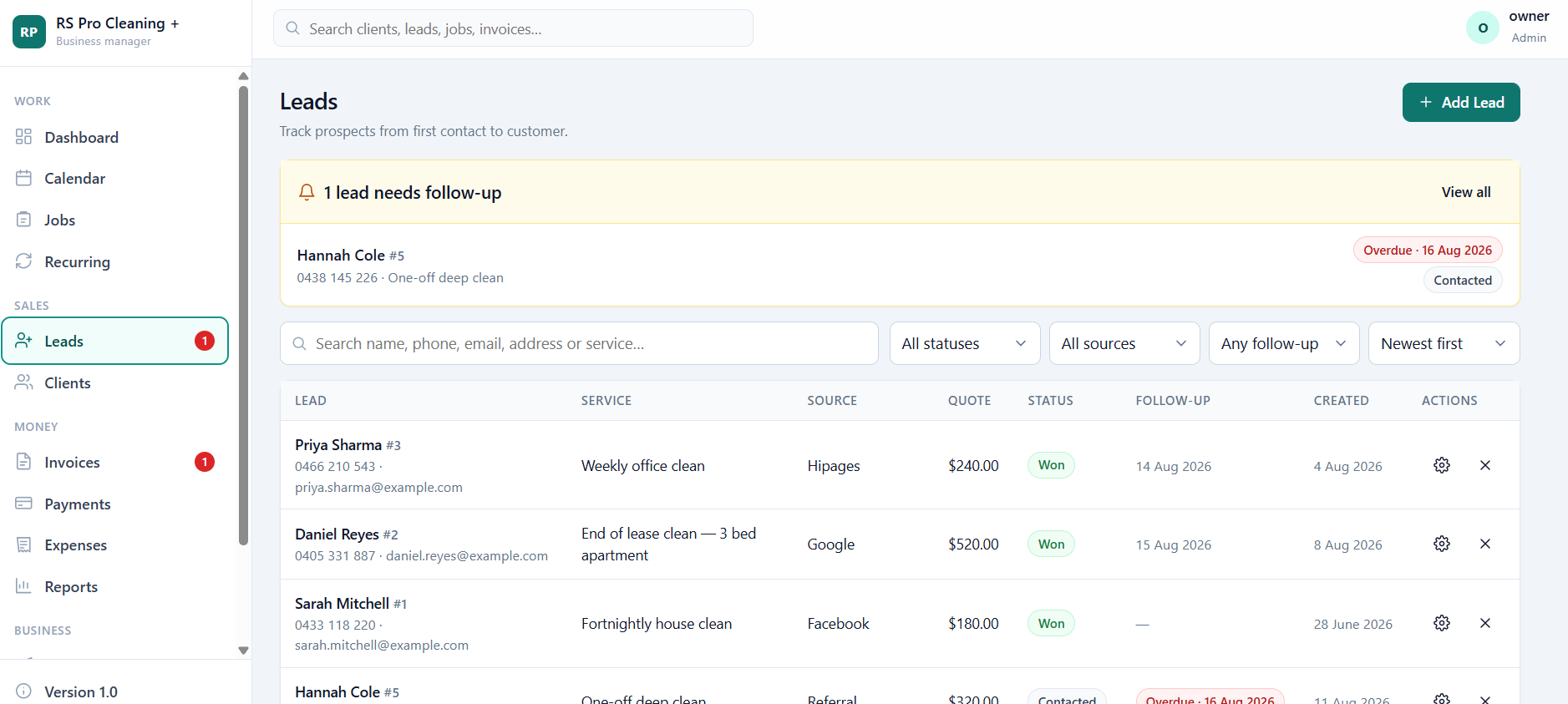
Every enquiry in one list with the service requested, where it came from, the quote you gave, its status and when to follow up.
The benefit: overdue follow-ups are flagged at the top of the page, so quiet leads don't quietly disappear.
Calendar
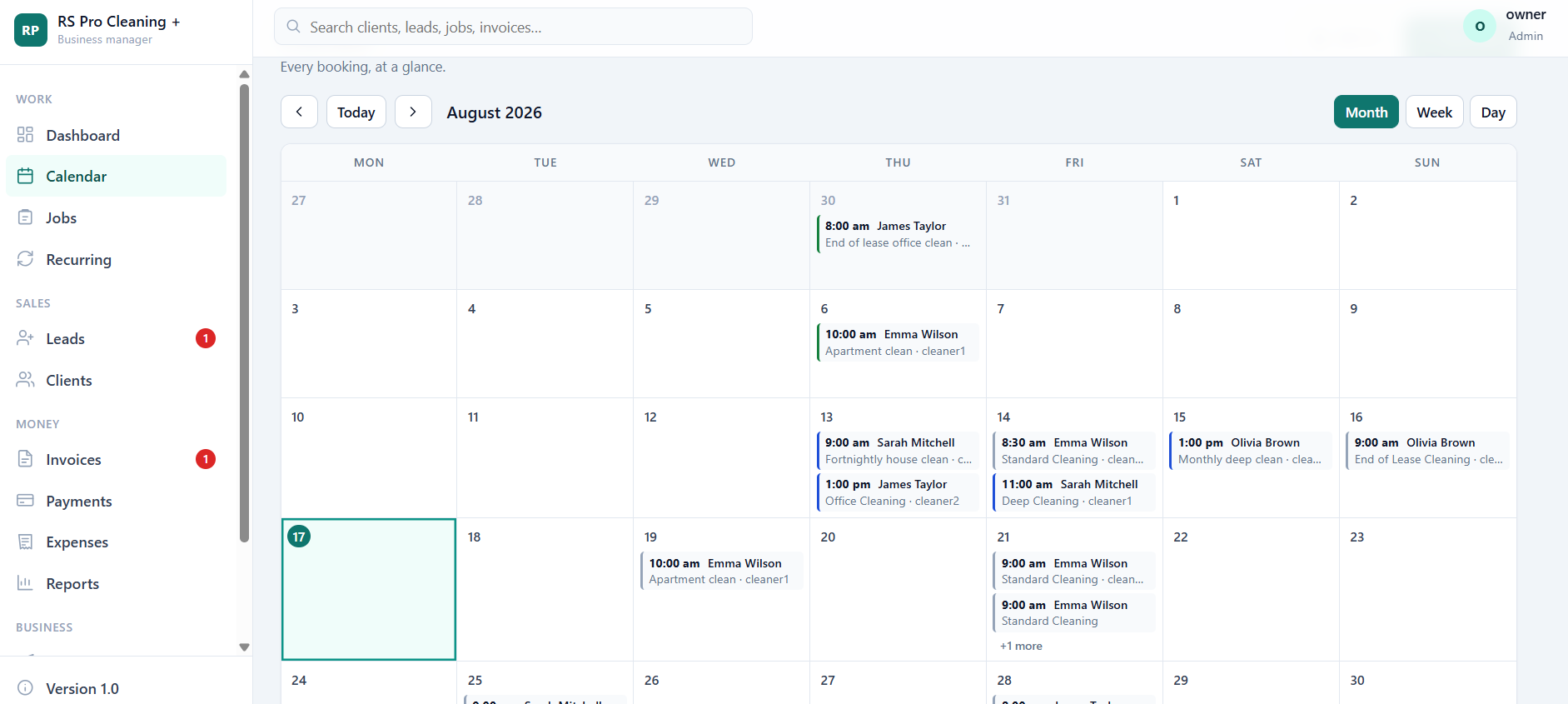
Every booking at a glance in month, week or day view — each one showing the time, the client, the service and who is covering it.
The benefit: the calendar and your job list are the same records, so a reschedule shows up everywhere at once.
Profit & loss
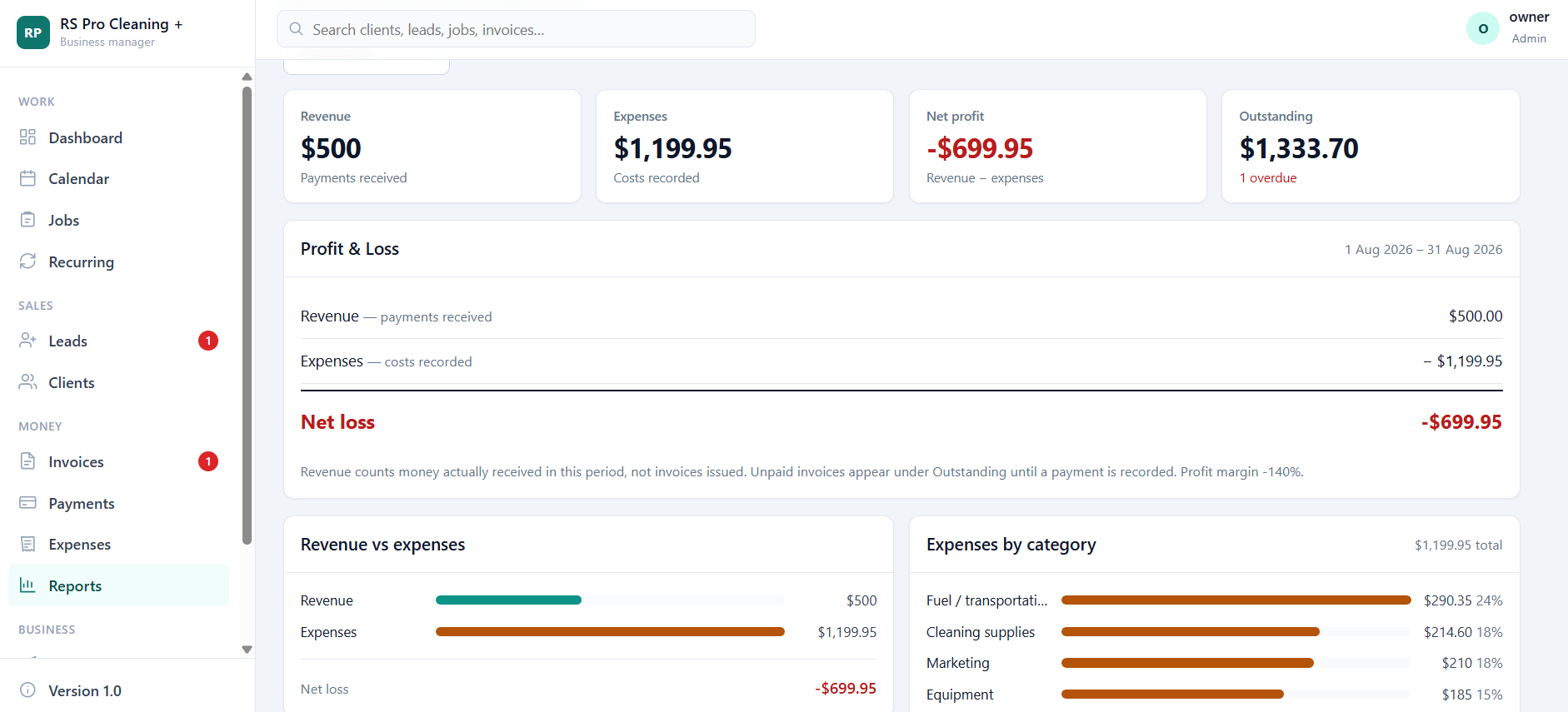
Revenue, expenses and profit for any period, with a plain-language statement, revenue-versus-expenses comparison and expenses broken down by category.
The benefit: revenue counts money actually received, not invoices issued — so the figure means something. Your dashboard and this report always agree.
Leads & clients
Never lose a lead again
Capture enquiries from every source and keep their status in one pipeline — so you always know who's waiting on a quote and who needs a nudge.
Jobs & scheduling
Your team always knows what's next
Every booking carries its own date, time, address, service, price, cleaner and notes — and the app checks before you double-book anyone.
Calendar views
Month, week and day, colour-coded by job status.
Cleaner assignment
Assign or reassign in a couple of taps; unassigned jobs get flagged.
Job status
Scheduled, confirmed, in progress, completed or cancelled.
Conflict detection
A warning before you book a cleaner who's already busy.
Recurring cleaning
Stop rebuilding the same bookings every week
Set the pattern once — weekly, fortnightly, three-weekly, monthly or a custom interval — and the bookings appear on the calendar for you, without duplicates. Skip a single visit when a customer goes away, or pause the whole schedule when they take a break.
- Automatic booking generation for the weeks ahead
- Skip or cancel one occurrence without touching the rest
- A regular cleaner attached to the schedule
Invoicing & payments
Finish the job. Create the invoice. Get paid.
Raise the invoice straight from the completed job — the client, the address, the service and the agreed price come across with it. No second app, no retyping.
What's on the invoice
Payments are recorded as they come in — bank transfer, cash or card taken elsewhere — and the balance owing updates itself. Card payments aren't collected inside the app.
Business control
Know if your business is actually making money
Money received, costs recorded and what's left over — for this month, last quarter or the whole year. You don't have to stitch three spreadsheets together to answer the only question that matters.
Team access
Give your team access — without giving them everything
Each cleaner gets their own login. Keep pricing and financial information restricted while they focus on the jobs assigned to them.
Owner / admin
- Leads, clients, jobs and the calendar
- Invoices, payments and expenses
- Profit reporting and business settings
- Adds team members and sets their access
Cleaner
- Their own assigned jobs and schedule
- The address, service and notes they need
- Status updates and notes they can edit
- No pricing, invoices, payments or reports
Anywhere access
Your office isn't always an office
Manage the business from your computer. Let cleaners update their jobs from their phones. It's a website with a layout built for small screens — bottom navigation, card-style lists and touch-sized buttons — so there's nothing to install or update.
Made yours
Your business is unique. Your software can be too.
The system is set up around how you actually work — your name on it, your services, your prices, your paperwork.
Your brand
Business name, logo and details across the app and on every invoice.
Your services
The list of cleans you actually sell, ready to pick when booking a job.
Your money settings
Currency, tax name and rate, invoice numbering, terms and payment details.
Your team's access
Who signs in, what they can see, and who can change what.
Your workflow
Adjustments to how jobs, statuses and paperwork flow for your operation.
Pricing
Simple, flexible pricing
Two ways to buy, depending on whether you'd rather own the system or have it looked after for you.
Option 1
One-time purchase
For businesses that prefer to own their system outright.
- The full application, set up for your business
- Your branding, services and invoice details
- One upfront cost, no ongoing licence
Option 2 · looked after for you
Managed plan
For businesses that prefer a lower upfront cost.
- Hosting and setup handled for you
- Maintenance and updates included
- Lower cost to get started
Not ready to talk numbers? Open the live demo first — it costs nothing and answers most questions.
Built for real cleaning business operations
A working application in daily use, not a mock-up or a prototype.
Secure sign-in
Every user has their own password-protected account.
Your data, separated
Each business's records are kept to that business.
Role-based access
Cleaners see their jobs; financials stay with the owner.
Professional invoices
Branded documents with a proper PDF to send.
Online access
Sign in from any modern browser; nothing to install.
Mobile-friendly
A layout built for phones, used in the field daily.
Regular improvements
The product keeps being developed and refined.
Try before you buy
A live demo with sample data, open to anyone.
Built with real cleaning business workflows in mind
Every screen in this product exists because a cleaning business needed it — quoting, rescheduling, chasing an invoice, working out whether a month was profitable. Customer stories will appear here as businesses come on board; we won't print any until they're real.
Judge it for yourself in the demoFrequently asked questions
Is this a real working application?+
Yes. The live demo is the actual application running on sample data — the same screens you'd use with your own business information.
Can I try it before purchasing?+
Yes, and we'd rather you did. Open the demo and click through it as the owner or as a cleaner — no signup, no sales call.
Can my employees have their own login?+
Yes. Each cleaner gets their own account, and the Team screen is where you manage names, phone numbers, roles and whether an account is still active.
Can I control what employees can access?+
Yes. There are two levels: owner/admin sees everything, and cleaner sees only their own assigned jobs with no pricing, invoices, payments or reports. They can update job status and notes, and that's it.
Can I use it on my phone?+
Yes. It's a website with a layout designed for small screens rather than a native app from an app store — so it works on your phone browser with nothing to install.
Can I manage leads and turn them into clients?+
Yes. Leads carry their source, service, quote, status and follow-up date; when you win one, converting it creates the client record without you re-entering anything.
Can I schedule recurring cleaning jobs?+
Yes — weekly, fortnightly, three-weekly, monthly or a custom interval. The bookings are generated onto the calendar for the weeks ahead, and you can skip a single visit or pause the schedule.
Can I create professional invoices and download PDFs?+
Yes. Invoices carry your logo and business details, itemised services, discounts, tax, terms and payment instructions — and you can download a proper PDF or print it.
Can I record partial payments?+
Yes. Record each payment against the invoice with its date, method and reference; the invoice shows paid, partly paid or unpaid and keeps the remaining balance right. Card payments are not collected inside the app — you record money received elsewhere.
Can I track expenses and profit?+
Yes. Log costs by category and the Profit & Loss report shows revenue, expenses and what's left for any period, with a month-by-month view and a printable version.
Can the software be customised for my business?+
Yes. Your name, logo, services, currency, tax settings, invoice details and user roles are all yours to set. If you need something beyond that, tell us what it is and we'll quote it.
Do I need to install software, and how does hosting work?+
Nothing to install — you sign in through a browser, so it needs an internet connection. The application runs online, and with a managed plan the hosting and updates are handled for you.
Is there a monthly subscription?+
You choose: a one-time purchase if you'd rather own the system, or a managed plan with hosting, maintenance and updates included. Ask for a quote and we'll set out both.
Does it send reminders to customers automatically?+
Messages are prepared for you from templates with a preview of exactly what each person receives, but nothing goes out unattended — you always press send. Live delivery of email, SMS or WhatsApp needs your own messaging provider connected first.
Ready to get your cleaning business organised?
Don't just read about it. Open the real application and see how it works — then tell us what your business needs and we'll quote it.
Tell us your business name, how many cleaners you have and what you're using today.
Custom quote
Get Your Custom CleanFlow Quote
Tell us a little about your cleaning business and what you need. We'll review your requirements and get back to you with the best CleanFlow option for your business.
Thanks — we've received your request.
We'll review your business details and get back to you with your custom CleanFlow options.
Back to CleanFlow